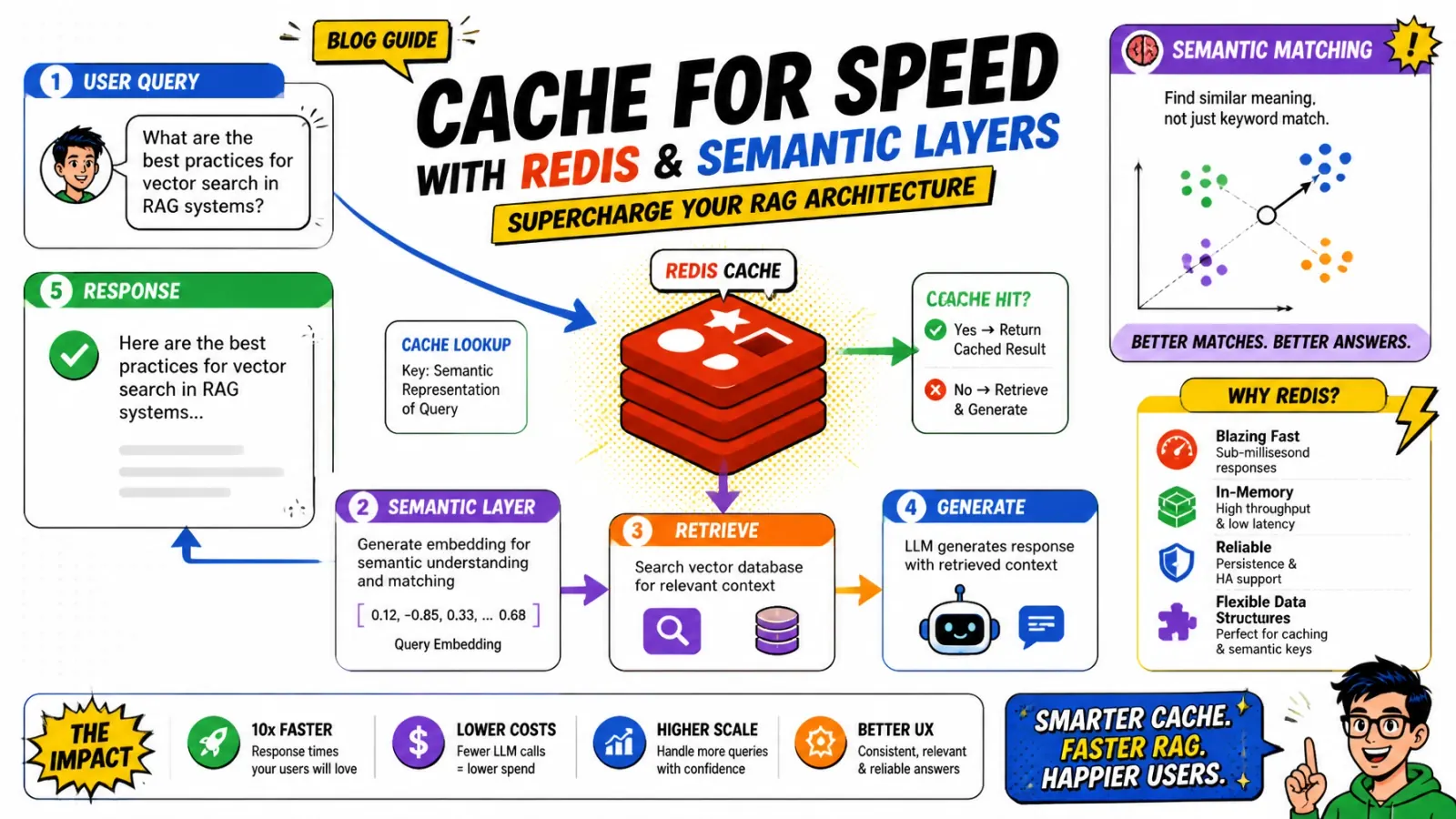
The cheapest LLM call is the one you never make. A two-tier Redis cache answers repeat questions in milliseconds and keeps them off your API bill.
You shipped your RAG pipeline. Retrieval is accurate and the LLM is quick. Then you look at your cloud bill and your P99 latency.
Every query, even “what are your shipping times?” for the tenth time, runs the full chain: embedding, vector search and an expensive LLM call.
Paying twice for the same answer
At scale you pay for the same computation over and over. Users wait two seconds for answers that could take twenty milliseconds, and your “denial of wallet” risk climbs.
The fix is a smarter cache. Semantic caching with Redis turns a multi-second chain into a single-digit-millisecond lookup. At the hit rates a busy FAQ bot reaches, it can cut LLM API spend by roughly half. Provider prompt caching saves on a different part, the long prefix you resend on every call, and my prompt caching calculator shows when that pays off.
The two-tier cache
Standard caching relies on exact matches. “How do I reset my password?” and “how do i reset my password” can share a key if you normalize the string. “Can you help me change my password?” misses a traditional cache.
Tier 1: exact cache
A plain key-value entry in Redis. I normalize the query (lowercase, trim, strip punctuation) and hash it. My SHA hash generator shows what those keys look like.
It’s the first line of defense: almost free, with zero false positives.
Tier 2: semantic cache
If the exact cache misses, I embed the query and look for a close match in a Redis vector index. If a previous question is close enough (a cosine distance of 0.1 or less, about 0.9 similarity), I serve the cached answer instead of calling the LLM.
You never do the heavy lifting twice for the same intent.

Why Redis for semantic caching
Most developers think of Redis as a key-value store. With the Redis Vector Library (RedisVL), it also works as a fast vector index.
Why not use your main vector DB, like Pinecone or Weaviate? Latency.
Small index, close to the app
Your main vector DB is tuned to search millions of document chunks. The semantic cache is much smaller: recent queries and their answers. Redis usually already sits next to your application, so you skip network hops.
I typically see Redis vector lookups finish in under 5 ms. An embedding API call takes around 100 ms and an LLM generation around 1,500 ms.
| Path | Typical latency | LLM cost |
|---|---|---|
| Exact cache hit | A few ms | None |
| Semantic cache hit | Embedding plus under 5 ms lookup | None |
| Full RAG pipeline | 1.5 to 2+ seconds | Full call |
Implementing the semantic layer
The key setting is the similarity threshold. Too loose and you give users wrong answers (the “semantic trap”). Too strict and you never get a hit.
I start with a distance threshold of 0.1. RedisVL measures Redis cosine distance on a 0 to 2 scale, where lower is stricter, so 0.1 is roughly 90% similarity.
from redisvl.extensions.cache.llm import SemanticCache

# Initialize the cache with a conservative threshold and a 4-hour TTL
llm_cache = SemanticCache(
    name="production_rag_cache",
    redis_url="redis://localhost:6379",
    distance_threshold=0.1,
    ttl=14400,
)

def answer(query: str) -> str:
    hit = llm_cache.check(prompt=query)
    if hit:
        return hit[0]["response"]

    response = run_rag_pipeline(query)
    llm_cache.store(prompt=query, response=response)
    return response
This wrapper embeds the incoming query, runs the vector search in Redis and returns the closest cached response when one is within the threshold.
Avoid the semantic trap
Semantic caching is useful but risky if you aren’t careful. When your underlying data changes, the cache can keep serving old, wrong answers.
Version your context
I include a context_version in cache keys or metadata. When I re-index the product catalog or update the docs, I bump the version. Old entries stop matching and the next request rebuilds them with fresh data.
Isolate tenants
If User A asks “what is my balance?”, you can’t serve that answer to User B. I partition the cache:
- Namespaces:
cache:tenant_id:query_hash - Metadata filters: add
tenant_idas a filterable field on the vector index.
Semantic matches then only happen inside the right security boundary. My post on Laravel multi-tenancy uses the same isolation principles.
Shared cache
Partitioned cache
tenant_id and the current context_version, so a hit can only come from the same tenant and the same data.TTL and staleness
In a standard cache you set a 3,600-second expiry and forget it. With a semantic cache I use tiers:
- Exact matches: 1-hour TTL. Same question, same answer.
- Semantic matches: 4-hour TTL, with a “last validated” timestamp. These cost more to produce, so I keep them longer.
- Proactive invalidation: when a Shopify product price changes, a Redis worker purges every entry tied to that product ID.
Watch the sliding TTL
RedisVL refreshes the TTL on an entry every time check() matches it. A popular answer can live forever on its own, which is why versioning and proactive invalidation matter more than the TTL.
I’ve written about similar event-driven patterns for handling these updates at scale.

Measuring success
Don’t turn on the cache and walk away. Track two numbers:
- Cache hit rate: the share of queries Redis answers. I aim for 30 to 50% on general FAQ-style bots.
- Semantic precision: whether the cached answers are actually correct.
Review the borderline hits
I log every semantic hit with its distance. Once a week I sample the hits closest to the threshold (distance between 0.07 and 0.1) and review them by hand. If too many are different questions that only look alike, I tighten the threshold.
Key takeaways
- Install
redisvland set up a basic vector index in your dev environment. - Look up in two tiers: exact first, then semantic.
- Start strict: a distance threshold of 0.05 to 0.1.
- Partition and version: add
tenant_idandcontext_versionto avoid cross-talk and stale answers. - Measure: watch hit rate, precision and your API bill.
For more on production RAG, see 7 RAG mistakes in production or browse the architecture archive. If you want a cache like this in front of your own pipeline, here’s how I help teams cut RAG latency and LLM spend, or drop me a note.
Which query in your system keeps hitting the LLM when it shouldn’t?