Most developers interact with proxies every single day without realizing which direction the traffic is actually flowing.
The choice between a forward proxy vs reverse proxy comes down to one question: whose side is the middleman on?
You set up Nginx for a Laravel app, and it works. You route outbound traffic through a corporate proxy, and it works.
But when the site goes down under heavy load or your IP gets blacklisted, that distinction becomes the difference between a quick fix and hours of infrastructure debt.
In modern web architecture, a proxy is essentially a “middleman” server. It sits between two parties to facilitate communication.
However, the side it represents determines its name, its function, and its security benefits. This guide breaks down the core technical differences to help you choose the right pattern for your next deployment.
The forward proxy: protecting the client
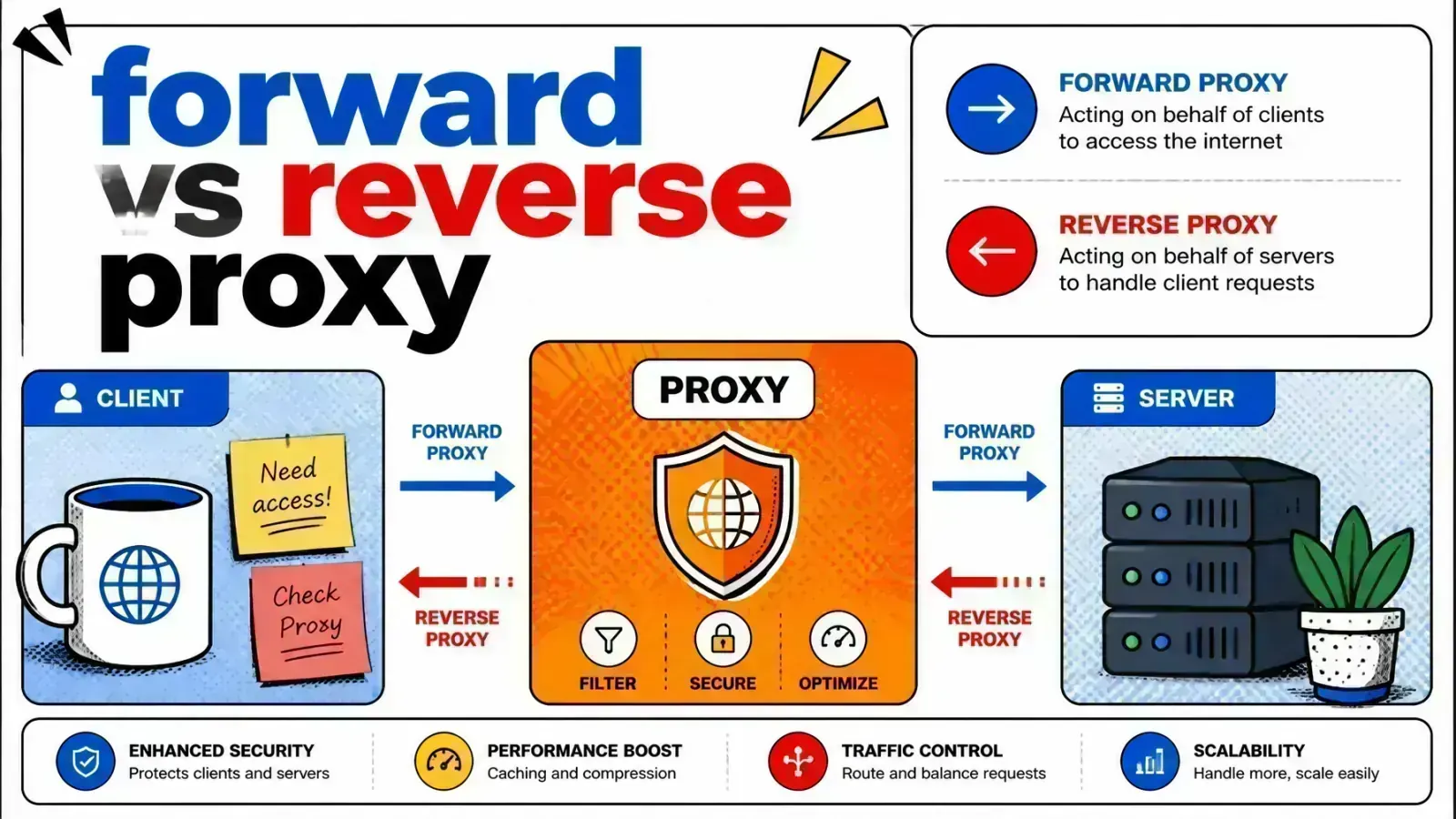
A forward proxy sits in front of one or more client machines and acts as their representative to the open internet.
When a user makes a request to a website, the request first hits the forward proxy. The proxy then evaluates the request, sends it to the web server, and passes the response back to the user.
From the perspective of the internet, the forward proxy is the one making the request. The original client’s IP address remains hidden behind the proxy’s IP. This is a common setup in corporate environments or for users seeking anonymity.

Why use a forward proxy?
Forward proxies are primarily used to manage and secure outbound traffic. Here are the most common engineering use cases:
- Anonymity and privacy: By masking the client IP, forward proxies prevent websites from tracking individual users based on their network location.
- Content filtering: Organizations use forward proxies to block access to specific URLs or categories of websites. If a request violates a security policy, the proxy simply drops it.
- Bypassing geo-restrictions: If you need to access a service only available in another region, a forward proxy located in that region can make your request appear local.
- Caching for performance: If multiple clients in the same network request the same external resource, the forward proxy can cache that response locally. This saves bandwidth and reduces latency for subsequent requests.
The reverse proxy: protecting the server
While a forward proxy represents the client, a reverse proxy represents the server. It sits at the edge of your infrastructure and intercepts all incoming requests from the internet before they reach your backend application.
The client believes they are communicating directly with the origin server. In reality, they are talking to the reverse proxy. The proxy then decides which backend server should handle the request.
This architecture is a cornerstone of modern cloud infrastructure and high-availability systems.

Why use a reverse proxy?
Reverse proxies are essential for scaling and securing web applications. They handle several “heavy lifting” tasks that your application code shouldn’t have to manage.
- Load balancing: This is the most common use case. A reverse proxy like Nginx or HAProxy distributes incoming traffic across multiple app nodes so no single server becomes a bottleneck. The overlap here is real enough that it’s worth reading load balancer vs reverse proxy to see where the two roles diverge.
- SSL termination: Managing TLS certificates on every backend server is a nightmare. A reverse proxy decrypts incoming HTTPS at the edge and forwards plain HTTP across a trusted internal network. If compliance demands end-to-end encryption, you re-encrypt to the backend with
proxy_pass https://andproxy_ssl_verify oninstead. - Security and WAF: Reverse proxies hide the existence and characteristics of your backend servers. You can run a Web Application Firewall (WAF) at the proxy level to filter SQL injection and XSS before they ever hit your code, and absorb volumetric DDoS traffic at the edge.
- Caching: By caching static assets or even entire HTML responses, a reverse proxy serves requests without touching the database or the application server. Push that cache out to the network edge and you are effectively running a CDN, which is why high-traffic sites need both.
Forward proxy vs reverse proxy: visibility and flow
The easiest way to remember the difference is to look at who is being “hidden” from whom.
| Feature | Forward Proxy | Reverse Proxy |
|---|---|---|
| Who it protects | The client | The server |
| IP hiding | Hides client IP from server | Hides server IP from client |
| Placement | Internal network (client-side) | Edge of the network (server-side) |
| Primary goal | Privacy, filtering, egress control | Load balancing, security, performance |
| Example tool | Squid, Privoxy | Nginx, HAProxy, Cloudflare |
Both are essential for clean architecture but solve entirely different problems.
Engineering implementations: Nginx and Docker
When building modern web applications, you are most likely to interact with reverse proxies. If you are using a tool like Coolify or Docker, the reverse proxy is often the component that manages your containers.
For instance, an Nginx reverse proxy configuration for a Laravel application might look like this:
server {
    listen 80;
    server_name myapp.com;

    location / {
        proxy_pass http://app_container:8000;
        proxy_set_header Host $host;
        proxy_set_header X-Real-IP $remote_addr;
        proxy_set_header X-Forwarded-For $proxy_add_x_forwarded_for;
        proxy_set_header X-Forwarded-Proto $scheme;
    }
}
In this setup, Nginx acts as the reverse proxy. It receives the request from the user and forwards it to the app_container.
It also passes along the X-Forwarded-For header so your application can still know the original user’s IP address if needed.
This is a critical pattern when building an API gateway for an AI stack or managing Shopify app extensions.
Advanced use cases: the mesh approach
In complex microservices environments, the lines blur. Service meshes like Istio and Linkerd typically deploy a “sidecar” proxy next to every service.
Each sidecar acts as both a forward and a reverse proxy depending on whether the traffic is ingress (incoming) or egress (outgoing).
This gives you fine-grained control over how services talk to each other. You can implement automatic retries, circuit breaking, and mutual TLS without writing a single line of application code.
While this adds complexity, it provides the level of observability and reliability required for enterprise-grade systems.
Key takeaways
- Forward proxies protect the user. Use them when you want to control how your internal network accesses the internet or to maintain user anonymity.
- Reverse proxies protect the infrastructure. Use them to scale your applications through load balancing, improve performance via caching, and secure your backend.
- Direction matters. A forward proxy handles outbound requests. A reverse proxy handles inbound requests.
- Nginx is the industry standard. It is the most common tool for implementing reverse proxies in Laravel and Docker environments.
- Security is centralized. Both types of proxies allow you to centralize security policies rather than implementing them on every individual device or server.
Understanding which direction traffic flows is the first step toward building resilient systems.
If you are managing a growing web application, you should focus on your reverse proxy configuration. It is one of the most useful tools you have for uptime and performance.
Have you ever found yourself troubleshooting an “IP mismatch” error caused by a misconfigured proxy header?