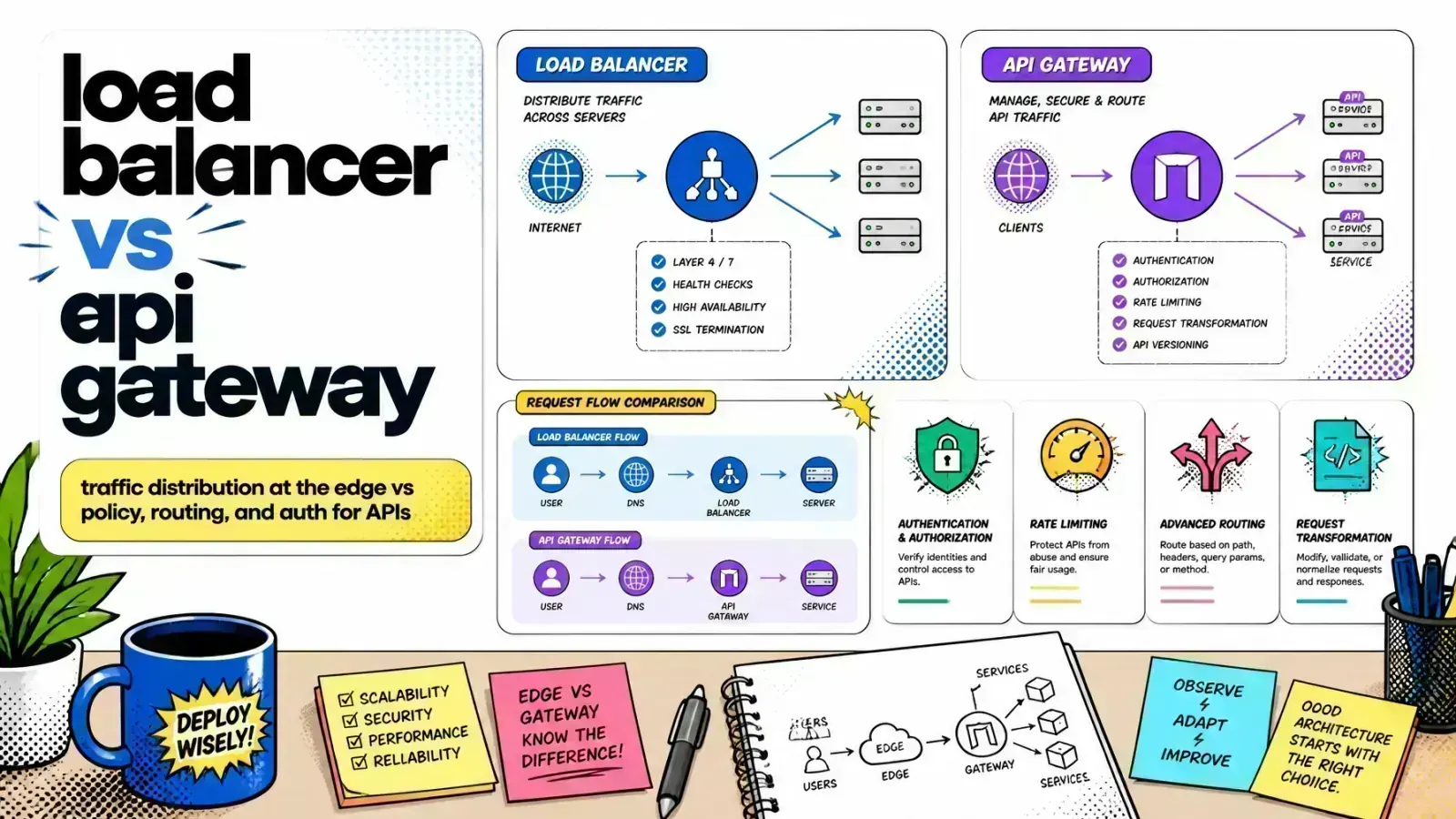
Two boxes sit at the front of almost every production system. One spreads traffic so nothing falls over. The other decides who gets in and where they go.
Engineers constantly confuse these two components. They look similar on an architecture diagram, but they solve very different problems.
Picking the wrong one costs you
Pick the wrong one and you either bolt fragile business logic onto a component built to be dumb and fast, or you pay for an expensive policy engine to do a job simple round-robin could handle.
The load balancer vs API gateway decision shapes how you scale, secure and observe everything behind it. Here is what each one does, where they differ and why mature systems almost always run both.
What a load balancer actually does
A load balancer has one job: take incoming traffic and spread it across a pool of identical backends so no single server gets overwhelmed.
It is the component that lets you run three copies of your app instead of one and survive a traffic spike.
L4 vs L7
Load balancers work at one of two layers. An L4 (transport layer) balancer routes by IP and port. It does not look inside the request and just forwards TCP/UDP packets, which makes it extremely fast.
An L7 (application layer) balancer understands HTTP. It can route based on the path or host header and terminate SSL/TLS. Algorithms like round-robin, least-connections and IP-hash decide which backend gets the next request.
Simple on purpose
A load balancer is largely stateless and content-agnostic. It cares about availability and distribution, not about who you are or whether you are allowed to make this call.
That ignorance is a feature: it keeps the component simple, fast and reliable. If you have wondered how this differs from a reverse proxy, the two overlap heavily. See load balancer vs reverse proxy for where they diverge.
What an API gateway actually does
An API gateway is the opposite kind of component. It is opinionated, aware and full of business rules. It sits in front of your services as a single, managed front door for every API call.
Cross-cutting concerns in one place
A gateway handles the cross-cutting concerns you don’t want duplicated in every microservice:
- Authentication and JWT validation
- Rate limiting and quota enforcement
- Request/response transformation
- Protocol translation (for example, exposing internal gRPC services as REST/JSON)
- Caching and per-client logging
Instead of each service re-implementing auth, the gateway enforces it once at the edge.
Routing by intent
A gateway routes by intent as well as availability. It maps /orders to the orders service and /users to the users service, applies the right policy to each and stitches a fleet of microservices into one coherent API.
That makes it a natural fit once you move from a monolith to microservices and need one stable front door over many services. It is also the base of a clean API gateway for an AI stack, where the gateway governs which model endpoints and tools a request can reach.

Key differences at a glance
Both sit at the front and both can route HTTP, but their purpose, intelligence and state are very different.
| Aspect | Load Balancer | API Gateway |
|---|---|---|
| Primary job | Distribute traffic across servers | Enforce policy + route by intent |
| Layer | L4 (TCP/UDP) or L7 (HTTP) | L7 (HTTP/API aware) |
| Awareness | Content-agnostic | Inspects auth, headers, payload |
| Core features | Health checks, SSL, algorithms | Auth, rate limiting, caching, transforms |
| State | Mostly stateless | Tracks clients, quotas, sessions |
| Optimizes for | Availability + throughput | Security + control |
The rule of thumb: reach for a load balancer when you need raw distribution and uptime, and an API gateway when you need to apply rules (who can call this, how often and in what shape).
The layered architecture: using them together
In production, it is common to see both components working together. Each layer does a different job: one spreads the traffic, the other decides what gets through.
A typical request flow
- The L4/L7 load balancer: sits at the very edge of your network. It handles global traffic distribution, terminates SSL/TLS and passes clean HTTP traffic to the API gateway.
- The API gateway: receives traffic from the load balancer. It checks the user’s JWT, confirms they haven’t exceeded their rate limit and routes the request to the correct microservice.
- The backend services: these often have their own internal load balancers. For example, your Laravel API might run three pods, and a simple internal load balancer (often built into Docker or Kubernetes) spreads the gateway’s traffic across them.
Scale each layer on its own
This separation of concerns lets you scale your infrastructure independently of your business rules.
You can rewrite authentication logic in the gateway without touching load balancer configuration, and you can add or remove backend replicas without the gateway noticing.
Auth in every service
Auth at the gateway
Implementing traffic control with Laravel and Docker
When developing with Laravel, you often don’t need a dedicated hardware appliance. You can build these patterns with open-source software like Nginx, Traefik or Kong.
Using Docker containerization makes this setup very portable.
Traefik labels as a gateway
If you use Traefik as an API gateway in a Docker Compose file, you can define your routing and middleware directly in the labels. That keeps your configuration close to your code.
services:
  laravel-api:
    image: your-org/laravel-app:latest
    labels:
      - "traefik.http.routers.api.rule=Host(`api.example.com`)"
      - "traefik.http.middlewares.api-auth.forwardauth.address=http://auth-service"
      - "traefik.http.middlewares.rate-limit.ratelimit.average=100"
      - "traefik.http.routers.api.middlewares=api-auth,rate-limit"
Here, Traefik plays the API gateway role: it checks with an external auth service and enforces rate limits before the request ever reaches the Laravel application.
Shopify and the gateway pattern
For Shopify developers, the API gateway pattern is very useful for “headless” storefronts. You talk to both the Shopify Storefront API and your own custom backend, and a gateway can unify these separate sources.
It can cache frequent Shopify queries to reduce API consumption and speed things up for the end user.
Logic Shopify doesn’t offer
A gateway also lets you add logic Shopify doesn’t support natively: transforming payloads or merging multiple sources into one response, which cuts the number of round trips the browser makes.
That pattern is a foundation for building agentic workflows in modern commerce.

Key takeaways
- Choose a load balancer for simple traffic distribution, high throughput and maximum availability at the network layer.
- Choose an API gateway for complex routing, security enforcement, protocol translation and a unified entry point to microservices.
- Layer your stack with an L4/L7 load balancer at the edge and an API gateway behind it for business logic.
- Use automation with tools like Docker and Coolify to manage these components without manual server configuration.
- Focus on observability by using the gateway’s per-client metrics for debugging and billing.
If you’re untangling the front door of your production stack, here’s how I help teams design load balancer and API gateway layers.
How do you handle cross-cutting concerns like rate limiting and authentication across your current microservice fleet?