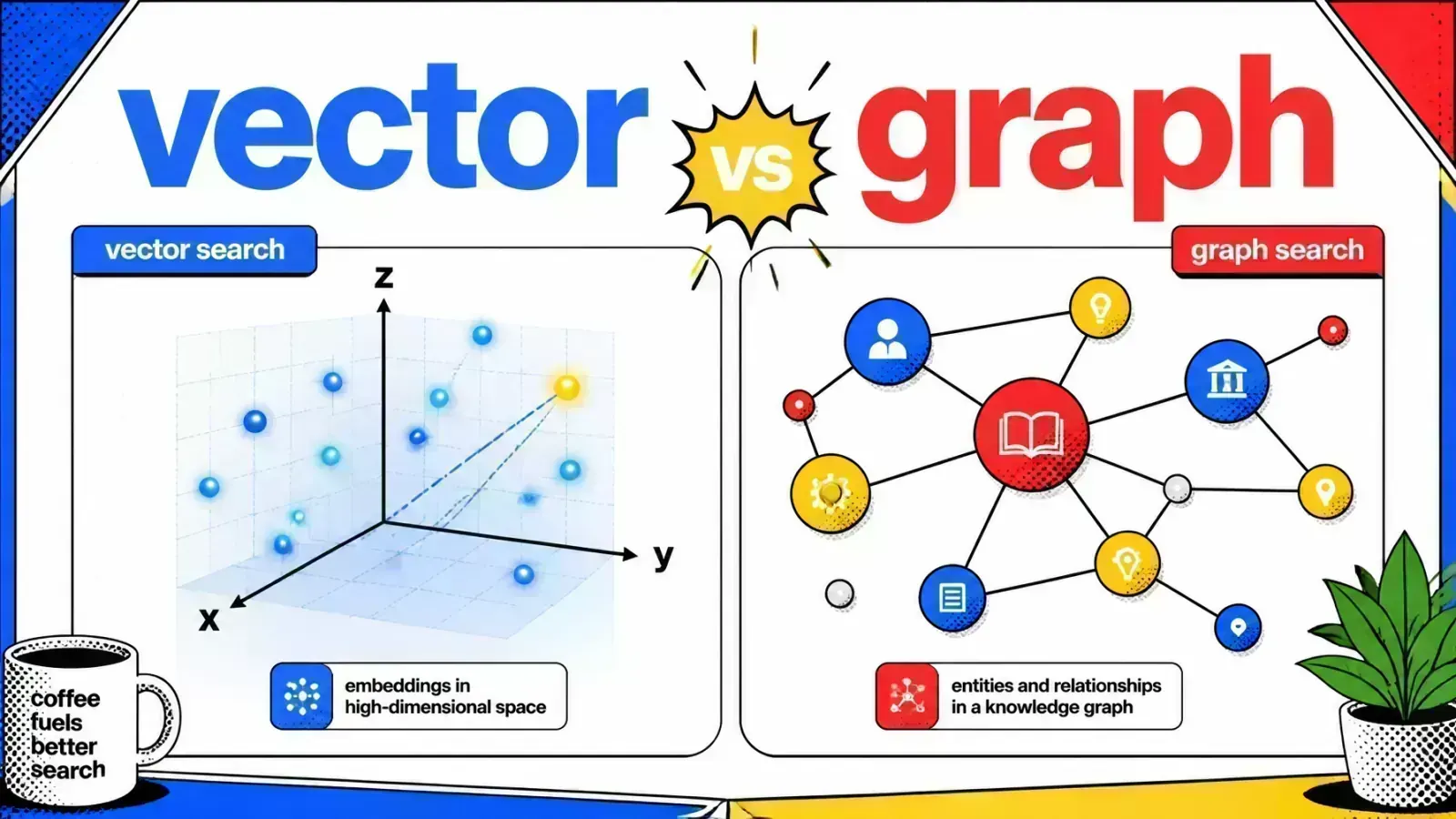
Vector search finds things that are similar. Graph search finds things that are connected. Multi-hop questions need the second.
Retrieval-Augmented Generation (RAG) forces a question most teams put off: how is data actually retrieved?
Most production systems start with vector search because it is accessible and effective for basic similarity. But as queries get more complex, the limits of semantic similarity show.
A system that finds “similar” things often fails when asked to explain “connected” things. That gap is where the choice between vector search and graph search decides whether your RAG strategy holds up.
Relying only on vector embeddings can lead to what is known as the semantic trap. You might retrieve five document chunks that all mention a topic, but if those chunks do not link to each other, the LLM will struggle to put together a multi-hop answer.
This often results in hallucinations or incomplete reasoning. If your RAG pipeline cannot traverse relationships, it is working with a deck of shuffled cards rather than an organized map.
The fix starts with understanding the trade-offs between vector-based and relationship-based retrieval. Vector search excels at high-dimensional similarity; graph search offers structured traversals that preserve the logic of your data.
Combining the two into a hybrid architecture is usually the safest path forward.
Understanding vector search and embeddings
Vector search works by converting unstructured data into dense numerical arrays called embeddings. These embeddings represent the semantic meaning of the text in a multi-dimensional space.
When a user submits a query, that query is also converted into a vector. The system then calculates the distance between the query vector and the stored vectors using measures like cosine similarity or Euclidean distance.
pgvector makes it accessible
For developers working within the Laravel or Node.js ecosystems, tools like pgvector have made this very accessible. By adding a vector column to a standard Postgres database, you can run similarity searches right next to your relational data.
This approach is very efficient for “fuzzy” matching. It can find a product description for a “crimson summer dress” even if the query only mentions a “red lightweight gown.”
No sense of structure
However, vector search is limited by its lack of structural awareness. It treats every chunk of data as an independent point in space.
It has no built-in understanding that “User A” is the “CEO” of “Company B” unless those words sit together in a single text chunk.

The mechanics of graph search
Graph search takes a different approach by modeling data as nodes (entities) and edges (relationships). Instead of looking for similarity in a coordinate system, graph search follows defined paths.
A node might represent a person, a place, or a concept, while an edge defines how they relate. For example, an edge labeled “works_at” might connect a person node to a company node.
Multi-hop queries
This structure allows multi-hop queries that are nearly impossible for pure vector search. You can ask the system to “find all employees at companies that use Laravel and were founded after 2015.”
A graph database like Neo4j or a graph-capable extension can follow these links precisely. In RAG, this means the retrieval engine can pull in a coherent chain of facts rather than a disjointed set of similar-sounding paragraphs.
The cost is ingestion
The challenge with graph search is the ingestion process. Vector search only requires an embedding model. Graph search requires entity extraction and schema mapping.
You must identify which entities exist in your text and how they relate before you can store them in the graph. This adds complexity to your data pipeline but pays off in reasoning accuracy.
Comparison: vector vs graph search
Choosing the right approach depends on the nature of your data and the questions your users ask. The table below outlines the main technical differences.
| Feature | Vector Search (pgvector) | Graph Search (Knowledge Graph) |
|---|---|---|
| Data Model | High-dimensional dense vectors | Nodes, edges, and properties |
| Query Type | K-Nearest Neighbors (k-NN) | Traversals and pattern matching |
| Strengths | Semantic similarity, fuzzy match | Complex relationships, multi-hop logic |
| Weaknesses | Struggles with structural reasoning | High ingestion complexity |
| Ideal For | FAQ bots, general search, broad Q&A | Fraud detection, supply chain, reasoning |
| Scaling | Efficient with ANN indexing (HNSW) | Sensitive to graph density and depth |
For a deeper look at avoiding common pitfalls in this space, see our guide on 7 RAG mistakes in production. Many teams start with vectors and only introduce graphs when they hit a “reasoning wall.”
GraphRAG: the hybrid evolution
The most advanced RAG systems are moving toward a hybrid model often called GraphRAG. This architecture does not choose one over the other. It uses both to give the LLM richer context.
In a GraphRAG setup, the system first runs a vector search to find relevant starting points in the knowledge base. From those starting points, it uses graph traversals to pull in related entities and their relationships.
Vector-only RAG
GraphRAG
A worked example
Imagine a medical research application. A vector search might find a paper about a specific drug.
The graph search then identifies the chemical compounds in that drug, the clinical trials associated with it, and the known side effects reported in other related papers.
The context given to the LLM is a structured “subgraph” of knowledge. This reduces the risk of hallucinations because the LLM is working with explicitly linked facts.
Running the stack
This hybrid approach needs a solid DevOps foundation. Tools like Docker and Coolify can help manage the services involved, including your vector store, graph database, and the extraction services that keep them in sync.
If you are exploring how to host these stacks, our article on Coolify and self-hosted SaaS is a good starting point for infrastructure management.

Technical implementation with pgvector and SQL
For teams already using Postgres, pgvector is the logical starting point for adding vector capabilities. It fits into existing SQL workflows.
You can store your embeddings in a vector column and use the <-> (Euclidean) or <=> (cosine distance) operators to query them.
-- Example: Finding similar document chunks in Postgres
SELECT content, 1 - (embedding <=> '[0.1, 0.2, 0.3, ...]') AS similarity
FROM document_chunks
ORDER BY embedding <=> '[0.1, 0.2, 0.3, ...]'
LIMIT 5;
Let the index do its job
Order by the distance expression itself and keep the LIMIT. That is the shape pgvector’s HNSW and IVFFlat indexes can use. To see how big those indexes get and how much RAM they need, try my pgvector size calculator.
A WHERE filter on the similarity score (for example > 0.8) cannot use the index and forces a full scan, so apply a score threshold to the five rows you get back instead.
When joins stop scaling
To approximate a graph without a dedicated graph database, you can model simple one-to-many or many-to-many relationships with relational joins.
But as the number of hops grows, recursive joins and WITH RECURSIVE queries get expensive fast, and the planner struggles to keep them efficient.
That is the point to introduce a specialized graph layer such as Neo4j or the Apache AGE extension, which adds openCypher graph queries directly to Postgres. For the broader question of which retrieval components to assemble, see picking the right RAG stack.
Choosing your path
The decision between vector and graph search is not binary. It is a spectrum of technical complexity versus reasoning capability.
For simple semantic search over a collection of PDFs, vector search with pgvector is almost always the right answer. It is fast, easy to implement, and needs little maintenance.
When the graph is worth it
If your application needs high precision, multi-step logic, or the ability to explain “why” a result was chosen, the investment in a knowledge graph is necessary.
The overhead of building an extraction pipeline is the price you pay for a system that understands the relationships within your data.
Most systems land in the middle
Most production AI systems will eventually use vectors for broad discovery and graphs for deep reasoning. If you design your system to be modular today, your infrastructure is ready to evolve as your AI needs grow.
Key takeaways
- Vector search is best for semantic similarity and is easy to implement using tools like pgvector.
- Graph search excels at multi-hop reasoning and mapping complex relationships between entities.
- Vector search treats data points as isolated, while graph search treats them as connected nodes.
- GraphRAG is a hybrid approach that uses vector search for discovery and graph search for context expansion.
- Start with vector search for most projects, but prepare for graph search if your queries require complex structural reasoning.
- Monitor retrieval metrics like recall and precision to spot when a vector-only strategy starts failing.
If you’re building a RAG pipeline for production, here’s how I help teams ship it.
How is your current RAG pipeline handling multi-hop queries that connect data points across documents?