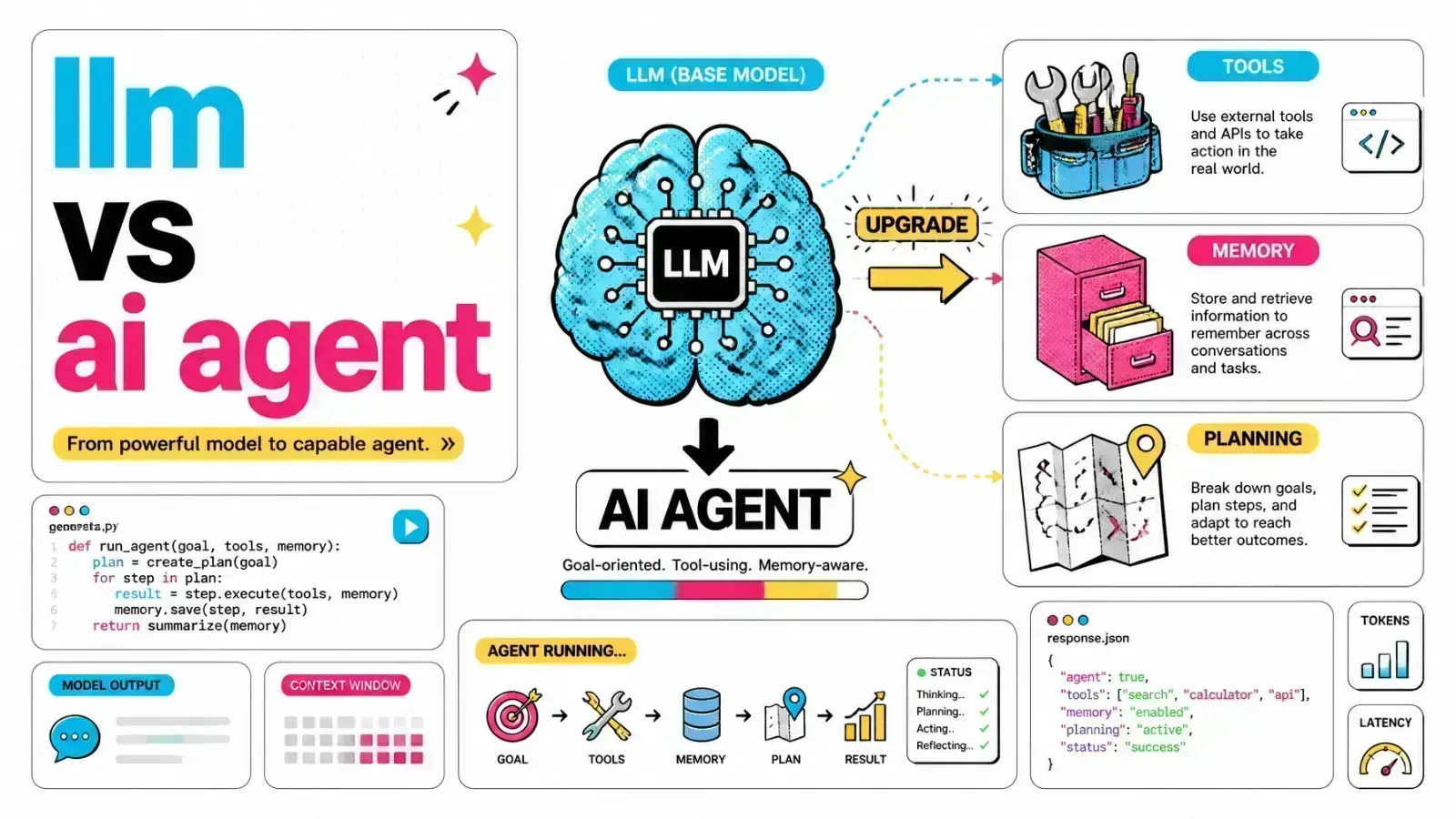
An LLM gives you great answers and zero execution. An agent wraps it in tools, memory and a loop so it can actually do the work.
Most developers start their AI journey by sending a prompt to an API and waiting for a text response. That works for simple summaries or creative writing.
It fails when the task needs real-world actions. A single chat completion cannot run a multi-step refund process in a Shopify store or navigate a complex database schema to build a report.
The architecture is the limit
What holds you back is the architecture around the model.
Relying only on Large Language Models (LLMs) is like hiring a genius professor who has no hands, no memory of yesterday and no computer. You get great answers but nothing gets done.
Agents add the missing parts
AI agents wrap the LLM in tools, memory and planning logic. Moving from “talking to a model” to “building an autonomous system” is one of the main changes in how we architect software today.
The LLM as a prediction engine
A Large Language Model is a stateless next-token predictor. When you send a prompt, the model uses its training to calculate the most probable sequence of words to follow your input.
It does not “think” in the human sense. It runs one forward pass per generated token through a very large neural network.
What a standalone LLM can’t do
The core traits of a standalone LLM:
- Statelessness: the model does not remember previous interactions unless you include them in the current prompt.
- Knowledge cutoff: it only knows what was in its training set up to a certain date.
- No external interaction: by default, it cannot check your email, query your production database or browse the web.
- Single-turn logic: it produces one output for one input. Any multi-step reasoning must happen inside that single output.
When that’s enough
For simple applications, this is fine. If you are building a basic API gateway for AI, a thin wrapper around a model might be all you need.
As soon as you need the system to take initiative, the LLM alone falls short.
Defining the AI agent: the reasoning loop
An AI agent is an autonomous system that uses an LLM as its central reasoning engine. Unlike a single LLM call, an agent works inside a loop.
It observes the environment, thinks about what to do next, takes an action with a tool, and then observes the result to decide its next step.
Agents fix their own mistakes
This loop lets the agent correct itself. If a database query fails, a standalone LLM would simply report the failure in its final response.
An agent sees the error, works out what went wrong and tries a different query. Interleaving a reasoning step with an action and then observing the result is the ReAct (Reasoning + Acting) approach introduced by Yao et al. in 2022.

The four pillars of agency
To turn an LLM into an agent, you add four layers of infrastructure.
1. Memory
LLMs have a “context window,” but it is temporary and expensive. Agents use external memory systems to keep state across sessions.
That includes short-term memory for the current task steps and long-term memory for user preferences or historical data. We often use vector databases like pgvector to store and retrieve these memories. The difference between the context window and persistent memory is what separates a toy from a production agent.
2. Tools
Tools are the hands of the agent: external functions, APIs or scripts the agent can choose to run.
When the agent sees it needs information it doesn’t have, it generates a structured command (usually a JSON object that matches the tool’s schema) to call a tool. This is what lets agents act on stacks like Laravel or a Shopify store.
3. Planning
Complex goals need to be broken into smaller tasks. An agent uses the LLM to create a roadmap.
For example, a high-level request like “Audit our cloud spend” gets split into sub-tasks: “List all AWS instances,” “Query pricing API” and “Generate CSV report.”
4. Reasoning
Reasoning governs how the agent uses the other three pillars. It is the control loop that keeps the system running until the goal is reached or a stopping condition is met.
Technical comparison
| Feature | Large Language Model (LLM) | AI agent |
|---|---|---|
| Execution | Passive (prompt-response) | Active (goal-oriented) |
| Persistence | None (stateless) | Persistent (external memory) |
| Capabilities | Text generation and analysis | Tool use, API calls, web browsing |
| Reasoning | One-shot internal logic | Multi-step iterative loop |
| Connectivity | Isolated | Integrated with external systems |
| Architecture | Model-centric | System-centric |
Transitioning from RAG to agentic workflows
Retrieval-Augmented Generation (RAG) was the first step toward more capable AI. In a standard RAG setup, you retrieve relevant documents from a vector store and stuff them into the LLM prompt. It is a linear process.
Agentic RAG
Agentic RAG goes further. Instead of a fixed retrieval step, the agent decides when to search, what keywords to use and whether the results were actually useful.
If the first search results are poor, the agent refines its query and searches again. I cover this in more depth in traditional vs agentic vs corrective RAG.
Standard RAG
Agentic RAG
Fewer bad retrievals
Take the 7 common RAG mistakes. An agentic approach can reduce problems like “hallucinated retrieval” by cross-referencing multiple sources or checking facts against a structured database.
Building agents in production
Building an agentic system takes more than an API key. You need a solid backend to manage state and run the tools.
Frameworks like LangGraph and CrewAI are popular with Python developers. In the PHP ecosystem, you can build capable agentic backends with Laravel and tools like Claude MCP.
MCP for tools
The Model Context Protocol (MCP) is especially useful for agent development. It gives agents a standard way to connect to local and remote data sources.
Instead of writing custom connectors for every tool, you can use MCP to give your agent direct access to your filesystem, GitHub repos or database schemas.
// Example of a tool definition in a Laravel-based agent
public function getTools(): array
{
    return [
        [
            'name' => 'query_shopify_orders',
            'description' => 'Retrieves order details from Shopify using GraphQL.',
            'parameters' => [
                'type' => 'object',
                'properties' => [
                    'order_id' => ['type' => 'string'],
                ],
            ],
        ],
    ];
}
Clear tool definitions
Clear tool definitions tell the agent exactly what it can do. The LLM then acts as the router, deciding which tool to trigger based on the user’s intent.

When to choose an agent over an LLM
Not every feature needs to be an agent. Agents are more complex to build, harder to test and can cost more because of multiple LLM calls.
Use a standalone LLM when:
- You need immediate, low-latency text generation.
- The task is simple and doesn’t need external data.
- The workflow is linear and predictable.
Use an AI agent when:
- The task needs multiple steps or logic branches.
- The system must interact with external APIs or databases.
- The goal is open-ended (for example, “Research this topic and find three competitors”).
- The system needs to learn and adapt over time using memory.
Key takeaways
- LLMs are the engine. They provide the reasoning but need a system around them to do real work.
- Agency is architectural. You build it by adding memory, tool use and planning layers to your model.
- Reasoning loops are key. Observing and correcting actions is what makes agents autonomous.
- Start with RAG, then move to agents. Agentic RAG is a natural next step for teams already using vector databases.
- Standardize your tools. Protocols like MCP make it easier to give agents the data they need without custom boilerplate.
If you want help turning a prompt-response feature into an agent that takes action, here’s how I work with teams shipping agents with tools, memory and MCP.
Is your current AI implementation stuck in a passive prompt-response loop, or are you ready to build systems that actually take action?